

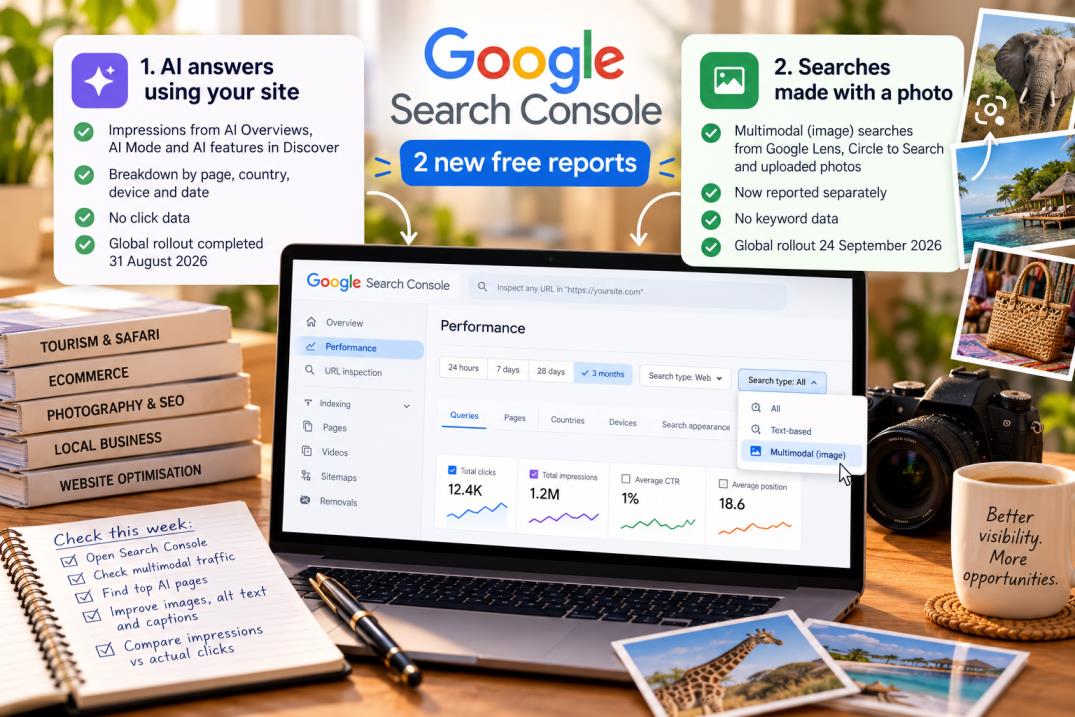
The short version: Google Search Console now has two new free reports every site owner should look at this week. One shows when Google’s AI answers used your site. The other shows when people found you by taking a picture instead of typing.
Both are already live worldwide. You do not pay anything, and you do not install anything.
Report 1: your visibility inside AI answers
- Shows impressions from AI Overviews, AI Mode and AI features in Discover.
- Broken down by page, country, device and date.
- Rolled out in stages from June 2026 and finished going worldwide on 31 August 2026.
- The big limitation: no click data. You can see that Google’s AI showed your content. You cannot see whether anyone came to your site because of it.
- If your site gets very few AI impressions, the report may not appear at all yet.
- There is also an opt-out toggle in Settings if you do not want your content used in those three AI features. Google says it will not hurt your normal search rankings. Page-level control is not expected until 2027.
Report 2: searches made with a photo
- Rolled out globally on 24 September 2026. In the Performance report, the search type filter now splits into Text-based and Multimodal.
- “Multimodal” means someone searched using an image: Google Lens, Circle to Search on Android, an uploaded photo, or right-clicking an image in Chrome.
- This traffic was never reported separately before. It was hidden inside your normal web results.
- No keyword data. Because the search was a picture, there are no query words to show you.
Why this one matters a lot in Kenya
- Tourism and safari sites: visitors photograph animals, birds, lodges and landscapes and search Lens to identify them. If your site has good wildlife or lodge images with proper alt text and captions, you may already be getting this traffic and never knew.
- Any shop: buyers photograph a product in someone else’s hand and search for it. That is a buyer at the sharpest point of intent.
- Everyone: if the AI report shows high impressions and your normal clicks are falling, you now have evidence for what is happening — rather than a feeling.
Do this today
- Open Search Console → Performance → Search type. Switch to Multimodal.
- Write down your multimodal impressions and which pages produce them. That is your baseline.
- Find the AI performance report and note your top five pages by AI impressions. Those are the pages Google’s AI already trusts. Strengthen them first.
- If multimodal traffic exists at all, go and fix your image filenames, alt text and captions on those pages. Descriptive beats clever.
- Compare AI impressions against your actual clicks for the same pages. If the gap is widening, your content needs to answer the question and give a reason to click — a price, a booking form, a map, a date.
- Do not use the opt-out toggle unless you have a specific reason. Invisibility is not a strategy.
Tool link: Google Search Console (free)