
Did you know that two businesses can bid on the exact same keyword in Google Ads, yet one pays less per click and appears higher on the search results page?
The difference often comes down to one overlooked factor: Google Ad extensions.
Many Kenyan SMEs spend money on Google Ads but struggle with low click-through rates, expensive clicks, and poor conversions. In many cases, the issue is not the product, service, or even the keywords. It is simply that the ads lack the extra information and relevance Google wants to see.
That is where ad extensions, now also called ad assets, become powerful.
Google Ad extensions allow businesses to add extra details to their ads, including additional links, unique selling points, service highlights, phone numbers, locations, and more. These additions do not just make ads look bigger and more professional. They can directly improve ad relevance, user experience, click-through rates, and even your Google Ads Quality Score.
For Kenyan businesses competing in industries like real estate, tourism, ecommerce, professional services, and hospitality, this matters more than ever. Digital advertising costs are rising, competition is increasing, and businesses need smarter ways to maximize every advertising shilling.
In this guide, you will learn:
- What Google Ad extensions are
- How site links, callouts, and structured snippets work
- Why extensions improve Quality Score
- Practical examples for Kenyan businesses
- Best practices to improve ad performance
- Common mistakes to avoid
By the end of this article, you will understand how to make your Google Ads more effective, more clickable, and more profitable.
What Are Google Ad Extensions?
Google Ad extensions are additional pieces of information added to your Google Ads to make them more useful and engaging.
Instead of showing only a headline and description, extensions allow your ad to include:
- Additional page links
- Product categories
- Unique selling points
- Contact information
- Business locations
- Promotions
- Prices
- App downloads
Google now commonly refers to these as “assets,” but many marketers still use the term “Google Ad extensions.”
These extensions help users make faster decisions while also improving the visibility of your ad on search results pages.
Why Google Ad Extensions Matter
Ad extensions matter because they improve three critical areas:
1. Higher Click-Through Rates (CTR)
Bigger, more informative ads attract more attention.
When users see extra information like pricing, offers, categories, or direct links, they are more likely to click.
2. Better Ad Relevance
Google wants to show ads that closely match user intent.
Extensions help provide more context about your business, products, and services.
3. Improved Quality Score
Quality Score affects:
- Cost per click (CPC)
- Ad rankings
- Ad visibility
Relevant extensions improve user experience, which can positively influence Quality Score.
Understanding Quality Score in Google Ads
Before discussing specific extensions, it is important to understand Quality Score.
Quality Score is Google’s rating of the quality and relevance of your ads, keywords, and landing pages.
It is influenced by:
- Expected click-through rate
- Ad relevance
- Landing page experience
A higher Quality Score can reduce advertising costs while improving ad positions.
For small businesses in Kenya working with limited advertising budgets, improving Quality Score can dramatically increase ROI.
How Google Ad Extensions Improve Quality Score
Google does not publicly confirm that extensions directly increase Quality Score. However, extensions improve the factors that influence it.
Here is how:
| Factor | How Extensions Help |
| Click-through rate | Larger ads get more clicks |
| Ad relevance | More detailed information improves matching |
| User experience | Users find answers faster |
| Engagement | Better interaction signals improve performance |
As a result, ads with well-optimized extensions often perform better than ads without them.
Site Link Extensions: Driving More Relevant Traffic
What Are Site Link Extensions?
Site link extensions add additional clickable links below your main ad.
Instead of sending all traffic to one page, users can choose the most relevant section directly.
For example, a safari company ad could include:
- Kenya Safaris
- Tanzania Tours
- Luxury Packages
- Budget Safaris
This improves user experience because people can immediately find what they want.
Example of Site Link Extensions
A Kenyan travel company could structure site links like this:
Main Ad:
“Affordable Kenya Safari Packages”
Site Links:
- Masai Mara Safaris
- Amboseli Tours
- Family Safari Packages
- Honeymoon Safaris
This makes the ad more detailed and useful.
Benefits of Site Link Extensions
Increased CTR
Users are more likely to click when they have multiple relevant options.
Better User Intent Matching
Site links help users navigate directly to relevant pages.
More Search Result Space
Your ad becomes larger and more noticeable.
Improved Conversion Rates
Visitors land on the exact page they need instead of searching manually.
Best Practices for Site Links
Use Specific Pages
Avoid generic links like “Home.”
Instead use:
- Pricing
- Services
- Packages
- Contact Page
- Testimonials
Include Relevant Keywords
Naturally include target keywords in site link text.
Keep Them Updated
Remove outdated promotions or seasonal offers.
Match User Intent
Think about what users are likely searching for.
Callout Extensions: Highlighting Your Unique Selling Points
What Are Callout Extensions?
Callout extensions are short snippets of text that highlight benefits or unique selling points.
Unlike site links, callouts are not clickable.
Their job is to persuade users.
Examples of Callout Extensions
A Kenyan ecommerce business might use:
- Free Delivery in Nairobi
- Secure Payments
- Same Day Dispatch
- 24/7 Customer Support
A law firm might use:
- Experienced Advocates
- Free Consultation
- Fast Response
- Trusted Legal Advice
Why Callout Extensions Work
Consumers make decisions quickly online.
Callouts immediately communicate value.
They answer questions like:
- Why choose this business?
- What makes them different?
- What benefits do they offer?
Best Practices for Callout Extensions
Focus on Benefits
Instead of saying:
“Established in 2010”
Say:
“15+ Years Experience”
Keep Them Short
Shorter callouts are easier to scan.
Avoid Repetition
Each callout should communicate something unique.
Use Real Competitive Advantages
Do not use vague phrases like:
- Best Service
- Quality Products
Be specific instead.
Structured Snippet Extensions: Organizing Information Clearly
What Are Structured Snippets?
Structured snippets showcase categories, services, products, or features in a structured format.
They help users understand what your business offers before clicking.
Examples of Structured Snippets
A Digital Marketing Agency:
Services:
- SEO
- Google Ads
- Social Media Marketing
- Web Design
A Hotel:
Amenities:
- Swimming Pool
- Free WiFi
- Airport Transfer
- Conference Rooms
A Fashion Store:
Brands:
- Nike
- Adidas
- Puma
- Converse
Benefits of Structured Snippets
Better Ad Clarity
Users instantly understand your offerings.
Improved Relevance
Google can better match your ad to searches.
More Qualified Traffic
People clicking already know what you offer.
Best Practices for Structured Snippets
Use Accurate Categories
Choose headers that fit your business.
Keep Values Relevant
Do not overload snippets with unnecessary information.
Prioritize Popular Services
List your strongest or most searched offerings first.
Practical Example for Kenyan SMEs
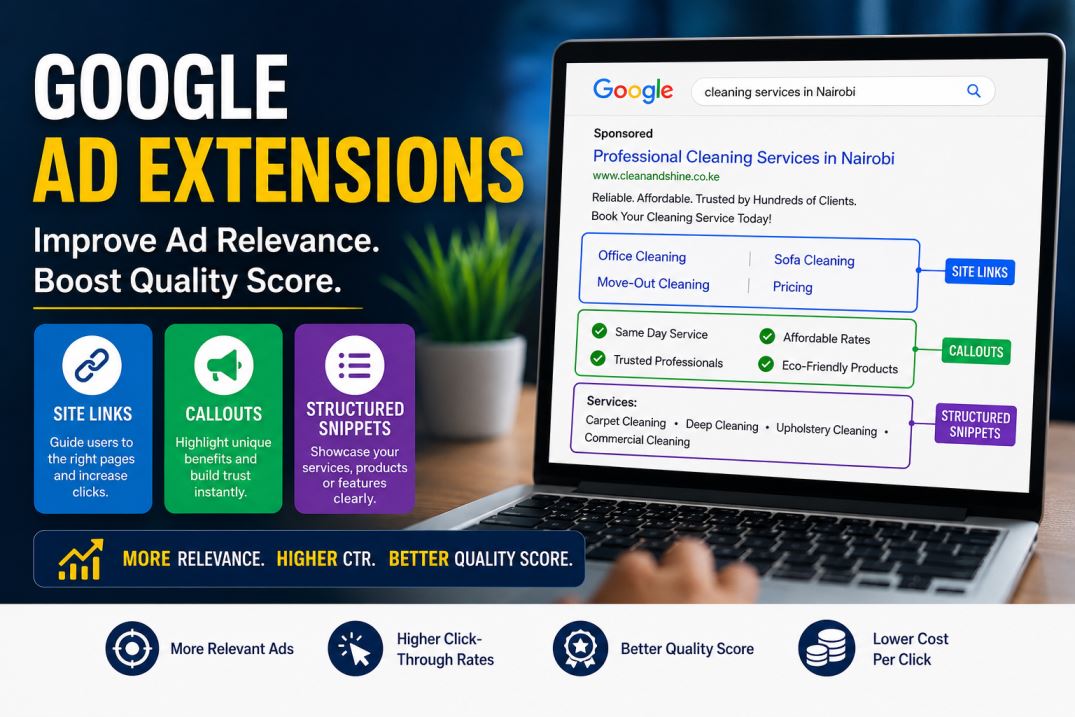
Imagine two cleaning companies in Nairobi running Google Ads.
Company A
Ad:
“Professional Cleaning Services in Nairobi”
No extensions.
Company B
Ad:
“Professional Cleaning Services in Nairobi”
With extensions:
Site Links:
- Office Cleaning
- Sofa Cleaning
- Move-Out Cleaning
- Pricing
Callouts:
- Same Day Service
- Affordable Rates
- Trusted Professionals
- Eco-Friendly Products
Structured Snippets:
Services:
- Carpet Cleaning
- Deep Cleaning
- Upholstery Cleaning
- Commercial Cleaning
Which ad would you trust more?
Most users will choose Company B because the ad appears more informative, relevant, and professional.
Common Mistakes Businesses Make with Ad Extensions
Using Generic Extensions
Weak:
- Quality Service
Better:
- 24-Hour Customer Support
Linking to Irrelevant Pages
Each extension should match user intent.
Forgetting Mobile Users
Many Kenyan users browse on mobile devices.
Keep extensions concise and mobile-friendly.
Ignoring Performance Data
Monitor which extensions generate clicks and conversions.
Remove underperforming ones.
Additional Google Ad Extensions Worth Exploring
Beyond site links, callouts, and structured snippets, you can also use:
- Call Extensions
- Location Extensions
- Promotion Extensions
- Price Extensions
- Lead Form Extensions
These can further improve visibility and engagement.
Tips to Maximize Results from Google Ad Extensions
Combine Multiple Extensions
Google can show several extensions together.
The more relevant information you provide, the better.
Align Extensions with Landing Pages
If your site link says “Pricing,” users should land directly on the pricing page.
Test Different Variations
Experiment with:
- Different callouts
- Different service lists
- Different site links
Optimization improves performance over time.
Focus on User Intent
Think like your customer.
What information would make them click?
Google Ads success is no longer just about choosing keywords and writing headlines.
Today, businesses must create ads that are relevant, informative, and user-focused. That is exactly what Google Ad extensions help achieve.
Site links improve navigation. Callouts highlight value. Structured snippets clarify offerings. Together, they make your ads stronger, more visible, and more trustworthy.
For Kenyan businesses competing in crowded digital markets, these small improvements can significantly reduce advertising costs while increasing clicks and conversions.
If your Google Ads are underperforming, adding and optimizing extensions may be one of the fastest ways to improve results without increasing your budget.
Start by reviewing your current campaigns today. Add relevant extensions, improve user experience, and monitor the impact on your click-through rates and Quality Score.
The businesses that win online are often not the ones spending the most, but the ones optimizing the smartest.
Frequently Asked Questions
What are Google Ad extensions?
Google Ad extensions are additional pieces of information added to Google Ads to improve visibility, relevance, and engagement.
Do Google Ad extensions improve Quality Score?
While Google does not directly confirm this, extensions improve click-through rates, ad relevance, and user experience — all factors connected to Quality Score.
Which Google Ad extensions are most important?
Site links, callouts, and structured snippets are among the most commonly used and effective extensions for SMEs.
How many extensions should I use?
Use as many relevant extensions as possible without overwhelming users. Google typically chooses which extensions to display based on relevance and performance.